
Processors and controllers
The control side of an indoor LED wall decides how cleanly content reaches the panels and how stable the image stays during daily use. We match processors, sending cards and playback hardware to the wall size, pixel pitch and the way your team needs to run it.
What sits behind the picture
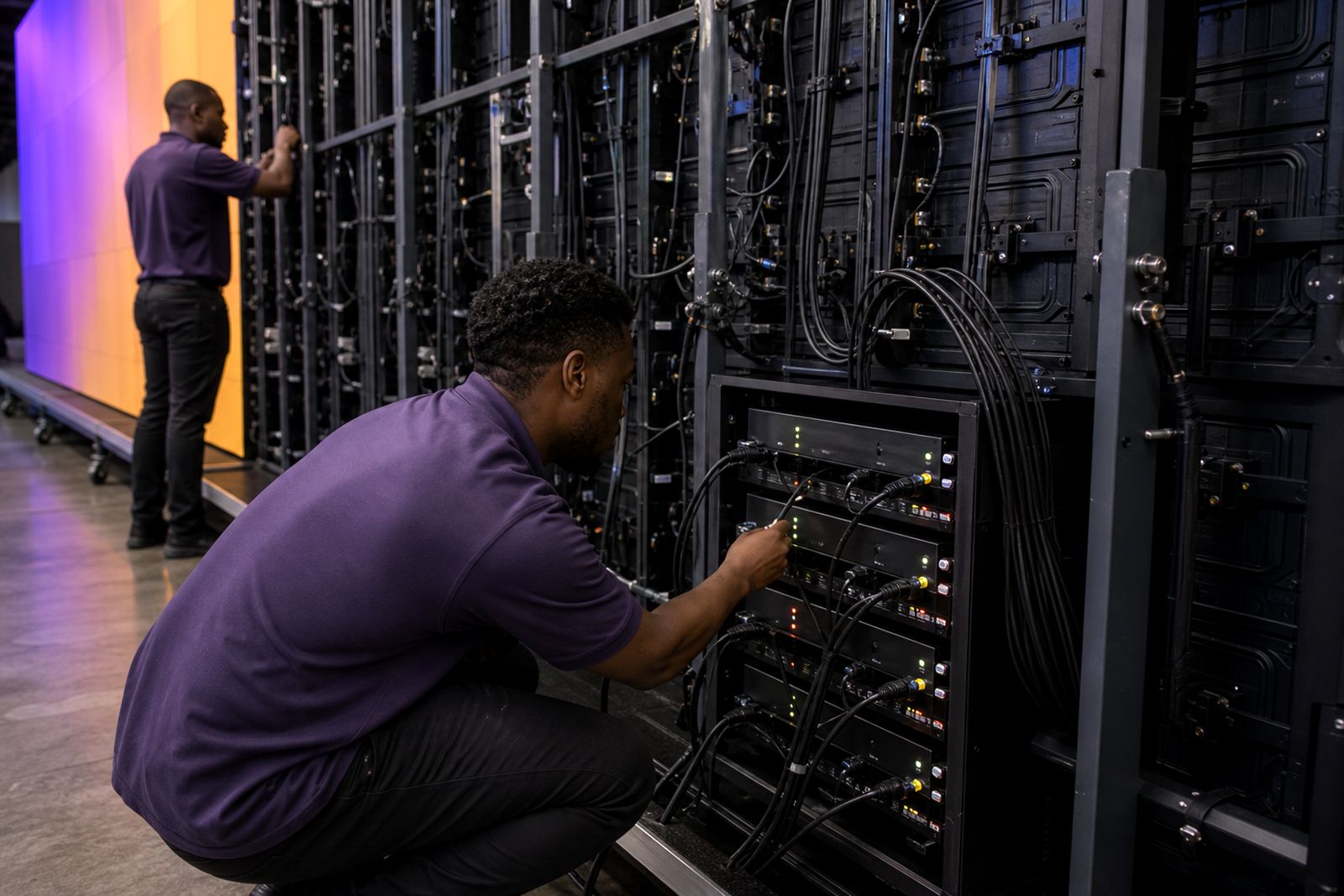
An indoor LED wall needs more than panels and frames. The control chain normally includes a video processor to accept sources and scale them correctly, a sending card or sending unit to distribute data to the cabinets, receiving cards inside the panels, and a playback device when content must run without a laptop connected all day.
For a boardroom wall, the job is often clean switching between a meeting PC, conferencing appliance and signage loop. In a retail store or church, the same wall may need scheduled playback, different aspect ratios and reliable start-up after mains interruptions. That is where the processor choice matters, not only the panel choice.
- Video processors for scaling, switching and output mapping.
- Sending cards or external senders for data distribution to the wall.
- Playback units for scheduled media, looping content and unattended operation.
- Control interfaces for source selection, presets and basic wall management.
Options, capacities and working limits
We size control equipment by total wall resolution, number of cabinets, cable runs and the inputs you need on site. Small walls in a conference room may work with a compact controller, while a wider feature wall in a mall shopfront usually needs higher pixel capacity and more output paths. If the wall is built from fine pitch panels, the controller must handle the denser pixel load without clipping the image or forcing awkward scaling.
Working limits matter. Every processor has a maximum load in pixels, a limit on output ports and a set number of live inputs. Playback units also differ in codec support, storage approach and scheduling functions. A wall can look bright and sharp but still feel frustrating if the processor cannot hold the native canvas cleanly.
- Entry control sets suit smaller indoor walls and simpler source switching.
- Mid-range systems suit boardrooms, studios, churches and shop displays with multiple inputs.
- Higher-capacity control sets suit wide walls, finer pitches and complex mapped layouts.
- Playback can be local to the rack or integrated with the room control arrangement.
Where the brief includes unusual content sizes, split screens or a wall taller than standard cabinet ratios, we check the mapping before the frame goes up. That avoids stretched logos, clipped subtitles and wasted pixels.
Best fit for boardrooms, retail floors and venues
Processors and controllers should be chosen around the room use, not only the wall dimensions. In Randburg boardrooms and conference rooms, clients usually want dependable switching, neat screen sharing and a picture that holds fine text at close viewing distance. Retail stores and malls often need scheduled media playback from open to close, with remote content changes handled by the client’s own team. Churches, clubs and event venues may need several source types and quick preset recall for different programmes.
These systems do not suit every display job. If you need an outdoor roadside billboard, a domestic television layout or projection across a temporary painted wall, this category is not the right one. We focus on indoor LED walls where the processor and playback side has to be tied properly to the panel system and mounting layout.
Site conditions that affect the control rack
The processor side is usually installed in a rack, credenza space or secure service area near the wall or nearby AV equipment. We look at cable routes, mains quality, ventilation and who will operate the system day to day. In a showroom or church there may be longer signal paths than expected, so cable planning has to happen before trim and joinery are finished.
Heat build-up inside enclosed joinery causes trouble more often than most people expect. Control units need airflow, stable mains and sensible cable management. Where load-shedding or generator changeover is part of the building routine, we plan the start-up sequence so the wall and processor return in a predictable way. For malls and commercial buildings, access windows and centre rules can also affect when equipment can be moved in.
- A ventilated rack or cabinet space with service access.
- Clean power from a protected circuit.
- Signal path planning from sources to processor and from processor to wall.
- Room for future access to ports, cards and cable terminations.
Day to day care and fault finding
Most control hardware needs very little day to day intervention once configured properly. The practical part is keeping ventilation paths open, checking cable strain, maintaining neat labels and making sure content sources still match the wall canvas. If a client changes laptops, conferencing hardware or playback files without checking output settings, the wall may show the wrong aspect ratio or an unstable handoff.
For venues and churches with regular programme changes, it helps to keep a simple operating sheet near the rack. We also recommend leaving mapped presets untouched unless a technician is on site, because one accidental setting change can shift the image across multiple cabinets. A clean control setup saves time later and prevents small faults from turning into a half-day chase.
Details that help us match the control side
When you send an enquiry through our contact form, the useful starting point is the wall size or target dimensions, the panel range you are considering, and the room type. Tell us whether the wall is for a boardroom, retail floor, church, studio or venue, and whether it is permanent or needs rental-ready handling. We also need to know how many content sources must connect at once and whether playback should run on a fixed schedule.
If you already have drawings, photos of the wall position or a reflected ceiling plan, include those. The more clearly we can see cable routes and equipment space, the cleaner the processor plan tends to be. For Johannesburg sites in finished offices this matters a lot, because retrofitting signal routes after furniture and ceilings are in place gets messy quickly.
- Wall width and height in millimetres or the intended cabinet layout.
- Viewing distance and whether fine text or spreadsheets must be readable.
- Source list such as meeting PC, media player, camera feed or signage playback.
- Rack location, available power and any building access limits.
- Whether your team wants simple switching only or scheduled playback as well.
What our LED Video Walls customers say
Verified Google reviews
Questions we get asked
Do I need a processor if the wall is only used for one laptop?
In many cases yes. The processor handles scaling, mapping and stable output to the LED wall, even when the source list is short. It also makes later expansion easier if the room use changes.
Can the wall run content without a computer left connected?
Yes, where playback hardware is included. That setup suits retail loops, church notices, foyer messaging and other content that should start and run as scheduled.
Will one controller work for any wall size?
No. Control equipment has pixel, port and input limits, so the right unit depends on the wall resolution, cabinet count, content layout and operating method.
Also worth a look
Tell us about the job
Send sizes, materials and where you are through our contact form, and we will come back with the practical options.
Open the contact form